6.9 KiB






📎 Telegram File Link Bot
A self-hosted Telegram bot that generates secure, rate-limited download links for uploaded files, with time-based expiration (TTL), an optional admin dashboard, and automatic cleanup.
The project can run locally, on a VPS, or on any cloud platform.
For the easiest setup, Railway is recommended.
🚀 Deployment (Railway – Recommended)

This repository is designed to be deployed directly as a Railway template.
Why Railway?
- Free public domain (
*.railway.app) included - Automatic HTTPS (no SSL setup needed)
- One-click PostgreSQL & Redis
- Easy environment variable management
- No server maintenance or manual provisioning
Steps
- Click Deploy on Railway
- Railway will create a new project from this template
- Add PostgreSQL and Redis plugins
- Set the required environment variables
- Optional: Enable Persistent Storage (Railway Buckets)
- Deploy
Your bot and download API will be live within minutes.
You can still deploy this project locally or on any VPS.
✨ Features
🤖 Telegram Bot
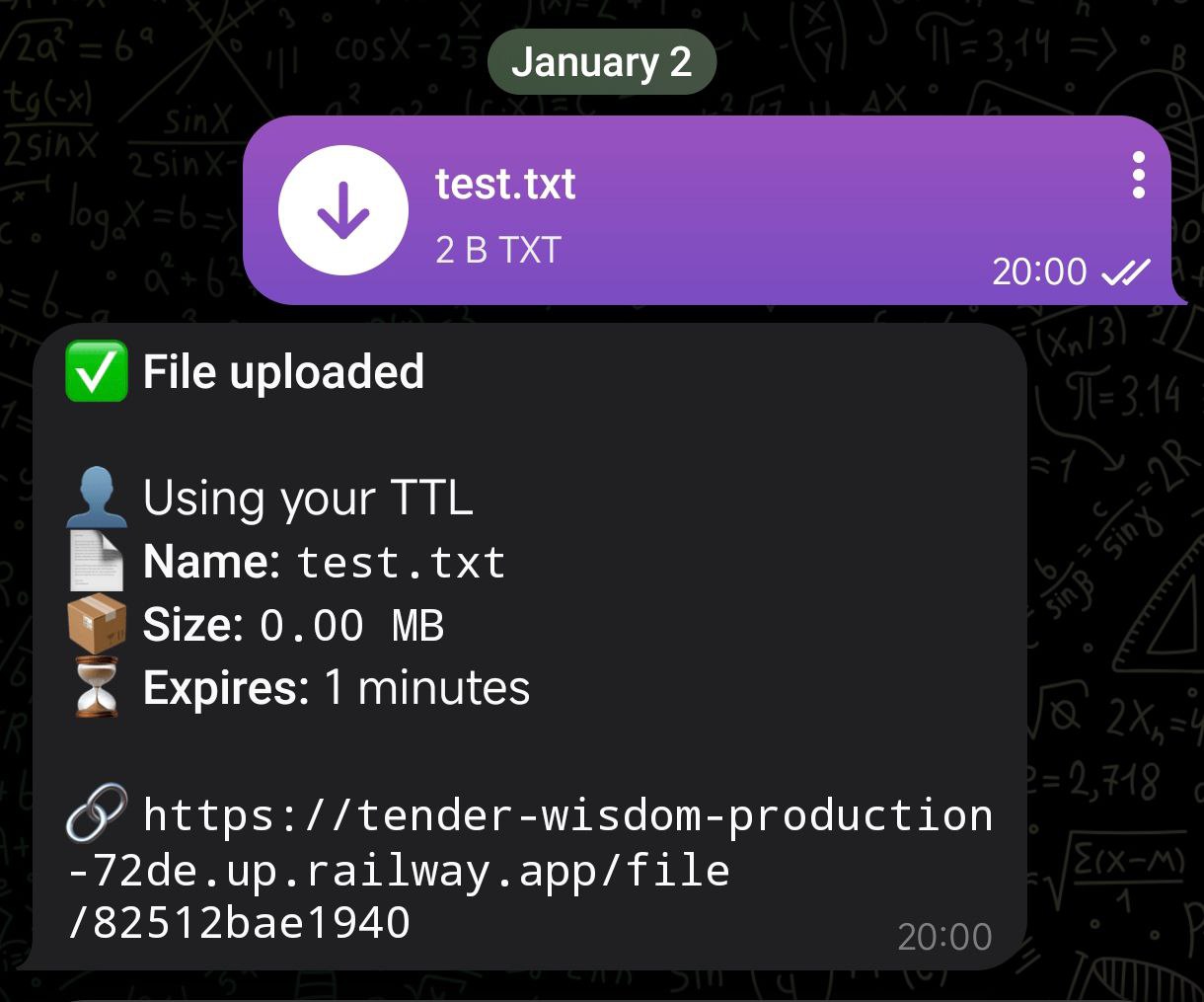
- Upload files via Telegram and receive a public download link
- Supports documents, videos, audio, photos, animations, voice, and video notes
- Preserves original file quality
- Optional private bot mode (allowed user IDs)
- Built with Pyrogram / Pyrofork
🔗 File Links
- Unique file IDs
- Direct downloads via FastAPI
- Correct filenames and headers
- Supports HTTP range requests (206 Partial Content)
⏳ Expiration (TTL Only)
- Optional expiration per file
- Time-based expiration only (no download limits)
- Unlimited downloads are always allowed
- Files expire automatically when TTL is reached
🔄 Upload Concurrency Control
- Limits how many file uploads are processed at the same time
- Prevents server overload and Telegram flood limits
- Extra uploads are automatically queued
- Fully configurable via environment variables
⚙️ Mode System (TTL Control)
TTL is controlled per user via Telegram commands.
Examples:
/mode ttl 30→ 30 minutes/mode ttl 2h→ 2 hours/mode ttl 1d→ 1 day/mode ttl 0or/mode reset→ Never expire
TTL is stored internally in seconds.
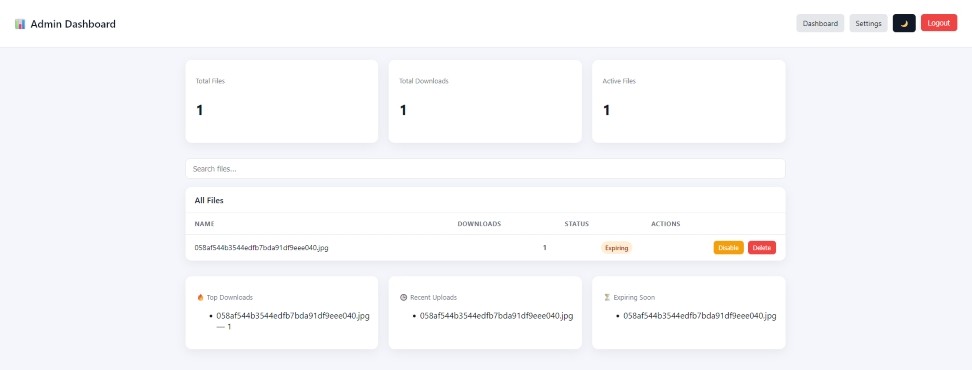
📊 Admin Dashboard (Optional)
Enabled only if ADMIN_ENABLED=true.
Features:
- Secure session-based login
- View total files, downloads, and active files
- Search files by name
- Disable files (expire immediately)
- Delete files
- View top downloads, recent uploads, and expiring files
- Light / Dark mode toggle
When enabled, the admin dashboard is available at:
https://your-domain.com/admin
If
ADMIN_ENABLED=false, the admin dashboard routes are not registered and the bot still works normally.
📸 Screenshots
Admin Dashboard
Telegram Upload
🧹 Automatic Cleanup
- Background task removes expired files
- Cleans database records and Redis cache
- Deletes expired objects from S3-compatible storage automatically
- Safe against partial failures
🚦 Rate Limiting
- Global per-IP rate limiting
- Redis-backed
- Proper
Retry-Afterheaders
🗄️ Storage Backends
This project supports two storage backends, selectable via environment variables.
Local Filesystem (default)
- Files are stored in the
uploads/directory - Suitable for local development and small deployments
- Files are removed automatically when TTL expires
S3-Compatible Object Storage (Recommended for Production)
- Files are stored in an S3-compatible bucket
- Supports Railway Storage Buckets, AWS S3, Cloudflare R2, and similar services
- Files are served via presigned URLs
- No service egress for downloads
- Files persist across deployments
- Automatic cleanup when TTL expires
On Railway, S3 credentials are injected automatically when you connect a Storage Bucket.
Enable S3 storage by setting:
STORAGE_BACKEND=s3
S3-Compatible Storage (Advanced / Non-Railway)
If you are using S3-compatible storage outside of Railway (e.g. AWS S3, Cloudflare R2, MinIO, Backblaze B2), you must provide the following environment variables:
AWS_ENDPOINT_URL=https://storage.example.com
AWS_S3_BUCKET_NAME=your-bucket-name
AWS_DEFAULT_REGION=auto
AWS_ACCESS_KEY_ID=your-access-key
AWS_SECRET_ACCESS_KEY=your-secret-key
🧱 Tech Stack
- Python 3.11+ (tested on 3.13)
- FastAPI
- Pyrogram / Pyrofork
- PostgreSQL (asyncpg)
- Redis
- Jinja2
- Vanilla HTML / CSS / JS
- S3-compatible object storage
⚠️ Database Schema Management
This project automatically creates and maintains its database schema at startup.
Migrations are intentionally omitted to keep the template simple and easy to deploy.
For larger or multi-tenant deployments, adding a migration system is recommended.
⚙️ Environment Variables
Create a .env file in the project root.
Tip: Rename
.env.exampleto.envand fill in your values.
Telegram Bot
API_ID=your_api_id
API_HASH=your_api_hash
BOT_TOKEN=your_bot_token
Upload Concurrency
MAX_CONCURRENT_TRANSFERS=3
Database & Cache
DATABASE_URL=postgresql://user:password@localhost:5432/filelink
REDIS_URL=redis://localhost:6379
Storage Backend
Choose where uploaded files are stored.
Local filesystem (default):
STORAGE_BACKEND=local
S3-compatible storage:
STORAGE_BACKEND=s3
If not set, the bot defaults to local filesystem storage.
Public URL
Local development:
BASE_URL=http://localhost:8000
Railway:
BASE_URL=${RAILWAY_PUBLIC_DOMAIN}
Custom domain:
BASE_URL=https://files.example.com
Rate Limiting
GLOBAL_RATE_LIMIT_REQUESTS=60
GLOBAL_RATE_LIMIT_WINDOW=10
Access Control (Optional)
ALLOWED_USER_IDS=123456789
Admin Dashboard (Optional)
ADMIN_ENABLED=true
ADMIN_EMAIL=admin@example.com
ADMIN_PASSWORD=change-me-now
SESSION_SECRET=change-me
▶️ Running Locally
pip install -r requirements.txt
uvicorn app.main:app --reload --log-level warning
🐳 Running with Docker
docker build -t telegram-file-link-bot .
docker run -d --env-file .env -p 8000:8000 telegram-file-link-bot
📜 License
Apache License 2.0